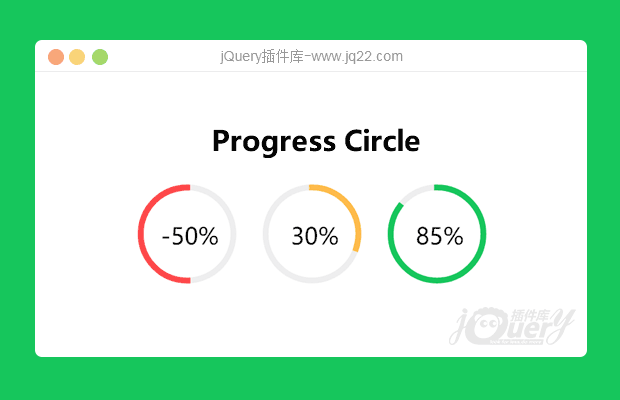


插件描述:ProgressCircle.js是一款基于SVG的jquery圆形进度条插件。该jquery圆形进度条插件通过动态生成SVG元素和CSS3动画来制作漂亮的圆形进度条动画特效。
使用方法
在页面中引入progresscircle.css和jquery以及progresscircle.js文件。
<link href="css/progresscircle.css" rel="stylesheet">
<scriptt src="jquery.min.js"></scriptt>
<scriptt src="progresscircle.js"></scriptt>
该jquery圆形进度条的基本html结构如下:
<div class="circlechart" data-percentage="-20"> -20% </div>
<div class="circlechart" data-percentage="50"> 50% </div>
data-percentage属性代表圆形进度条的百分比,可以是负数,负数表示反向执行动画。
PREVIOUS:
NEXT:
相关插件-加载
讨论这个项目(13)回答他人问题或分享插件使用方法奖励jQ币 评论用户自律公约


1.2.3 0
2019/6/19 15:53:00
-
如何动态复制啊,也就是这个百分比并不是写死的,求教

唐思远1
2019/7/16 13:44:15
// progresscircle.js

(function($) {

    $.fn.circlechart = function() {
        this.each(function() {
            var percentage = $(this).data("percentage");
            var inner_text = $(this).text();
            $(this).html(makesvg(percentage, inner_text));
        });
        return this;
    };
    // 添加的代码
    $.fn.setChart = function(val) {
        $(this).find('.circle-chart__circle').attr('stroke-dasharray', val + ',100').next().find('.circle-chart__percent').html(val + '%')
    }

}(jQuery));


// 调用
$('.circlechart').circlechart(); // 初始化
setInterval(() => {
    // 设置圆环
    $('.circlechart').data('percentage', $('.circlechart').data('percentage') + 1)
    // 设置文字百分比
    $('.circlechart').setChart($('.circlechart').data('percentage') + 1);
}, 2000)


良人 0
2018/5/23 9:54:05
-
挺好用的,就是这个颜色是怎么设置的?

西瓜0
2018/5/23 10:58:06
if(percentage < 0){
   classes = "danger-stroke circle-chart__circle--negative";
 } else if(percentage > 0 && percentage <= 30){
   classes = "warning-stroke";
 } else{
   classes = "success-stroke";
 }
目前会根据百分比调用对应的颜色样式,可根据需求修改就行了

😃
- 😀
- 😉
- 😥
- 😵
- 😫
- 😘
- 😡
- 👍
- 🌹
- 👏
- 🍺
- 🍉
- 🌙
- ⭐
- 💖
- 💔
😃
取消回复
- 😀
- 😉
- 😥
- 😵
- 😫
- 😘
- 😡
- 👍
- 🌹
- 👏
- 🍺
- 🍉
- 🌙
- ⭐
- 💖
- 💔
