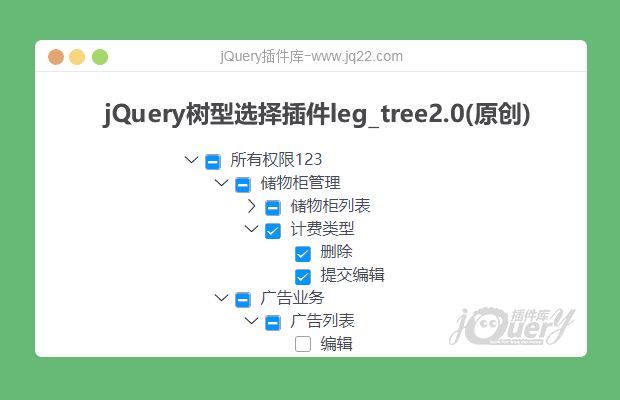


插件描述:jQuery树型选择插件可通过数组改变选中
更新时间:2020-01-14 22:30:32
更新说明:修改样式
icon只用添加class无序前缀 例:"ico": 'iconshezhi',
font中demo_index.html的icon不满足请请自行添加
更新时间:2020-01-12 22:37:32
不支持IE
var arrs = []
// var arrs = [1, 2, 3, 48, 5, 6, 7, 8, 9, 10]
/*
生成tree的位置 data为tree数据、arrs为选中的id可为空
arrs可填可不填 填写需为数组
data数据中的只有name、id、checked、open、ico、children和cascade
其中open为是否展开
ico为ico图片 icon-sousuo 例: <i ></i>(因麻烦只添加了3个测试ico)
ico 可用自己所使用UI的ico  例:<i ></i>
所填值 ivu-icon ivu-icon-ios-add-circle 为iview UI
值必须要有所用UI的前缀(不懂可自己去F12把class 里的值全部复制)
cascade为是否子父级联选中(cascade 必须在最高父级中写才生效)
*/
$("#demo").on("click", () => {
    alert(leg.getCheckedNodes())
    console.log(leg.getHalfSelected())
    console.log(leg.getAll());
})
leg.tree({
    ele: ".tree",
    data: data,
    arrs: arrs,
    cascade: true,
    onAsync: true
});
leg.synTree({ //异步加载
    ele: ".tree1",
    url: "./tree.json",
    dataStyle: (res) => { //修改后台返回的数据格式
        return res.list;
    },
    getData: (id, name) => { //返回的id和标题
        console.log(id + "======" + name)
    }
});
PREVIOUS:
NEXT:
相关插件-选择框,文件树
讨论这个项目(9)回答他人问题或分享插件使用方法奖励jQ币 评论用户自律公约


平平淡淡 才能细水长流 0
2020/5/27 18:09:03
页面中如果右其他的input就会报错。
$.each($("input"), function() {
    if (this.getAttribute('data-show') == 'false') {
        $(this).parent().find("ul").hide();
        if ($(this).parent().find("ul").length > 0) {
            $(this).prev()[0].setAttribute("style", 'transform:rotate(-90deg)');
        } else {
            $(this).prev()[0].setAttribute("style", 'opacity: 0;');
        }
    } else {
        $(this).parent().find("ul").show();
        if ($(this).parent().find("ul").length > 0) {
            $(this).prev()[0].setAttribute("style", 'transform:rotate(0deg)'); // 这里报错
        } else {
            $(this).prev()[0].setAttribute("style", 'opacity: 0;'); // 这里报错
        }
    }
});

Lucky8Guy0
2020/6/3 17:01:43
-
之前改了,上传比较麻烦
源码在 https://gitee.com/Lucky8Guy/LEG/tree/master/my-tree


😃
- 😀
- 😉
- 😥
- 😵
- 😫
- 😘
- 😡
- 👍
- 🌹
- 👏
- 🍺
- 🍉
- 🌙
- ⭐
- 💖
- 💔
😃
取消回复
- 😀
- 😉
- 😥
- 😵
- 😫
- 😘
- 😡
- 👍
- 🌹
- 👏
- 🍺
- 🍉
- 🌙
- ⭐
- 💖
- 💔
