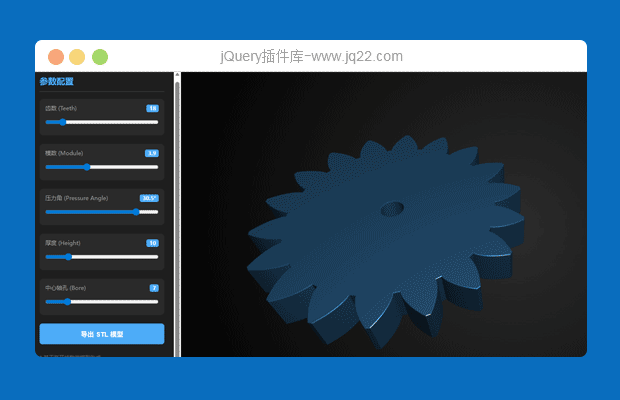


要实现类似 MakerWorld 的“参数化模型生成器(Parametric Model Maker)”,其核心技术栈通常是 OpenSCAD + WebAssembly (WASM) + Three.js。
MakerWorld 的这个功能本质上是在浏览器端运行了一个 OpenSCAD 引擎,通过修改 .scad 文件中的变量,实时重新渲染 3D 模型。
以下是实现这一功能的完整方案和代码架构:
1. 核心技术架构
引擎层 (Engine): OpenSCAD WASM 或 OpenJSCAD。它们可以将 OpenSCAD 代码在浏览器中直接编译成 3D 几何数据。
渲染层 (Renderer): Three.js。用于在网页上显示生成的 STL/Mesh 模型,并处理旋转、缩放、灯光。
UI 层: React, Vue 或原生 JS。用于生成左侧的参数调节面板(滑块、输入框)。
2. 极简版实现方案(基于 OpenJSCAD)
OpenJSCAD 是 OpenSCAD 的 Web 友好版本,最容易集成。
步骤 A: 基础 HTML 结构
<!DOCTYPE html>
<html>
<head>
    <meta charset="UTF-8">
    <title>极简参数化齿轮生成器</title>
    <style>
        body { margin: 0; font-family: -apple-system, BlinkMacSystemFont, "Segoe UI", Roboto, sans-serif; display: flex; height: 100vh; overflow: hidden; }
        #sidebar { width: 320px; background: #ffffff; border-right: 1px solid #e0e0e0; padding: 20px; overflow-y: auto; z-index: 10; box-shadow: 2px 0 5px rgba(0,0,0,0.05); }
        #viewer { flex: 1; background: #f0f2f5; position: relative; }
        h2 { font-size: 18px; margin-top: 0; color: #333; }
        .control-group { margin-bottom: 20px; }
        label { display: block; font-size: 13px; color: #666; margin-bottom: 8px; }
        input[type="range"] { width: 100%; cursor: pointer; }
        .value-display { float: right; font-weight: bold; color: #007aff; }
        button { width: 100%; padding: 12px; background: #007aff; color: white; border: none; border-radius: 6px; cursor: pointer; font-size: 14px; transition: background 0.2s; }
        button:hover { background: #0056b3; }
        .loading { position: absolute; top: 50%; left: 50%; transform: translate(-50%, -50%); display: none; }
    </style>
</head>
<body>

<div id="sidebar">
    <h2>齿轮参数设置</h2>

    <div>
        <label>齿数 (Teeth) <span id="v-teeth">20</span></label>
        <input type="range" id="teeth" min="8" max="100" value="20">
    </div>

    <div>
        <label>模数 (Module) <span id="v-module">2.0</span></label>
        <input type="range" id="module" min="0.5" max="10" step="0.1" value="2.0">
    </div>

    <div>
        <label>厚度 (Thickness) <span id="v-height">10</span></label>
        <input type="range" id="height" min="1" max="50" value="10">
    </div>

    <div>
        <label>孔径 (Hole Dia) <span id="v-hole">5</span></label>
        <input type="range" id="hole" min="0" max="30" value="5">
    </div>

    <button id="export">导出 STL 文件</button>
    <p style="font-size: 11px; color: #999; margin-top: 15px;">提示:调整滑块即可实时更新模型。</p>
</div>

<div id="viewer">
    <div id="loading">正在渲染...</div>
</div>

<!-- 引入 Three.js -->
<script src="https://cdnjs.cloudflare.com/ajax/libs/three.js/r128/three.min.js"></script>
<!-- 引入控制器 -->
<script src="https://cdn.jsdelivr.net/npm/three@0.128.0/examples/js/controls/OrbitControls.js"></script>
<!-- 引入STL导出器 -->
<script src="https://cdn.jsdelivr.net/npm/three@0.128.0/examples/js/exporters/STLExporter.js"></script>

<script>
    let scene, camera, renderer, controls, mesh;

    // 初始化 3D 场景
    function initScene() {
        scene = new THREE.Scene();
        scene.background = new THREE.Color(0xf0f2f5);

        camera = new THREE.PerspectiveCamera(45, (window.innerWidth - 320) / window.innerHeight, 0.1, 1000);
        camera.position.set(50, 50, 50);

        renderer = new THREE.WebGLRenderer({ antialias: true });
        renderer.setSize(window.innerWidth - 320, window.innerHeight);
        document.getElementById('viewer').appendChild(renderer.domElement);

        const light1 = new THREE.DirectionalLight(0xffffff, 1);
        light1.position.set(10, 20, 15);
        scene.add(light1);
        scene.add(new THREE.AmbientLight(0x404040));

        controls = new THREE.OrbitControls(camera, renderer.domElement);

        window.onresize = () => {
            camera.aspect = (window.innerWidth - 320) / window.innerHeight;
            camera.updateProjectionMatrix();
            renderer.setSize(window.innerWidth - 320, window.innerHeight);
        };
    }

    // 参数化齿轮形状生成逻辑 (近似渐开线齿轮)
    function createGearGeometry(teeth, m, height, holeDia) {
        const pts = [];
        const r_pitch = (teeth * m) / 2;
        const r_outer = r_pitch + m;
        const r_inner = r_pitch - 1.2 * m;

        for (let i = 0; i < teeth; i++) {
            const angle = (i / teeth) * Math.PI * 2;
            const nextAngle = ((i + 1) / teeth) * Math.PI * 2;
            const mid = (angle + nextAngle) / 2;

            // 简化的齿形逻辑
            pts.push(new THREE.Vector2(Math.cos(angle) * r_inner, Math.sin(angle) * r_inner));
            pts.push(new THREE.Vector2(Math.cos(angle + 0.1) * r_outer, Math.sin(angle + 0.1) * r_outer));
            pts.push(new THREE.Vector2(Math.cos(mid - 0.1) * r_outer, Math.sin(mid - 0.1) * r_outer));
            pts.push(new THREE.Vector2(Math.cos(mid) * r_inner, Math.sin(mid) * r_inner));
        }

        const shape = new THREE.Shape(pts);

        // 挖孔
        if (holeDia > 0) {
            const holePath = new THREE.Path();
            holePath.absarc(0, 0, holeDia / 2, 0, Math.PI * 2, true);
            shape.holes.push(holePath);
        }

        const extrudeSettings = { depth: height, bevelEnabled: true, bevelThickness: 0.5, bevelSize: 0.5, segments: 1 };
        return new THREE.ExtrudeGeometry(shape, extrudeSettings);
    }

    function updateModel() {
        const teeth = parseInt(document.getElementById('teeth').value);
        const m = parseFloat(document.getElementById('module').value);
        const height = parseFloat(document.getElementById('height').value);
        const hole = parseFloat(document.getElementById('hole').value);

        // 更新 UI 数值显示
        document.getElementById('v-teeth').innerText = teeth;
        document.getElementById('v-module').innerText = m;
        document.getElementById('v-height').innerText = height;
        document.getElementById('v-hole').innerText = hole;

        // 移除旧模型
        if (mesh) {
            scene.remove(mesh);
            mesh.geometry.dispose();
            mesh.material.dispose();
        }

        // 生成新模型
        const geometry = createGearGeometry(teeth, m, height, hole);
        const material = new THREE.MeshStandardMaterial({ color: 0x007aff, roughness: 0.3, metalness: 0.5 });
        mesh = new THREE.Mesh(geometry, material);
        mesh.rotation.x = -Math.PI / 2; // 调整为水平放置
        scene.add(mesh);
    }

    function animate() {
        requestAnimationFrame(animate);
        controls.update();
        renderer.render(scene, camera);
    }

    // 导出 STL
    document.getElementById('export').onclick = () => {
        const exporter = new THREE.STLExporter();
        const result = exporter.parse(mesh);
        const blob = new Blob([result], { type: 'text/plain' });
        const link = document.createElement('a');
        link.href = URL.createObjectURL(blob);
        link.download = 'custom_gear.stl';
        link.click();
    };

    // 监听输入
    document.querySelectorAll('input').forEach(input => {
        input.oninput = updateModel;
    });

    // 启动
    initScene();
    updateModel();
    animate();

</script>
</body>
</html>
代码核心逻辑解析:
3D 渲染引擎 (Three.js):
使用了 Three.js 及其 ExtrudeGeometry(挤出几何体)。它能将一个 2D 的齿轮轮廓沿 Z 轴拉伸,形成 3D 实体。
参数化计算:
在 createGearGeometry 函数中,通过齿数(Teeth)和模数(Module)计算出分度圆半径、齿顶圆和齿根圆。
使用 THREE.Shape 动态绘制齿轮的交替轮廓。
交互反馈:
所有的 input type="range" 都绑定了 oninput 事件,当用户拖动滑块时,程序会销毁旧几何体并立即生成新几何体,达到“实时预览”的效果。
STL 导出:
集成了 STLExporter。这在 MakerWorld 中是最核心的功能,允许用户将网页上生成的模型直接用于 3D 打印。
如何进一步完善(对接 OpenSCAD):
如果你需要处理原生的 .scad 文件,你需要集成 OpenSCAD.js (WASM)。其流程是:
用户修改参数。
JS 将参数拼接成 OpenSCAD 字符串。
调用 WASM 编译器在浏览器后台生成 STL。
Three.js 加载生成的 STL 进行展示。
上面的代码提供了一个轻量级的 Web 原生实现方式,不需要任何服务器支持,速度极快,适合作为你开发此类功能的第一步。



- 😀
- 😉
- 😥
- 😵
- 😫
- 😘
- 😡
- 👍
- 🌹
- 👏
- 🍺
- 🍉
- 🌙
- ⭐
- 💖
- 💔
- 😀
- 😉
- 😥
- 😵
- 😫
- 😘
- 😡
- 👍
- 🌹
- 👏
- 🍺
- 🍉
- 🌙
- ⭐
- 💖
- 💔
