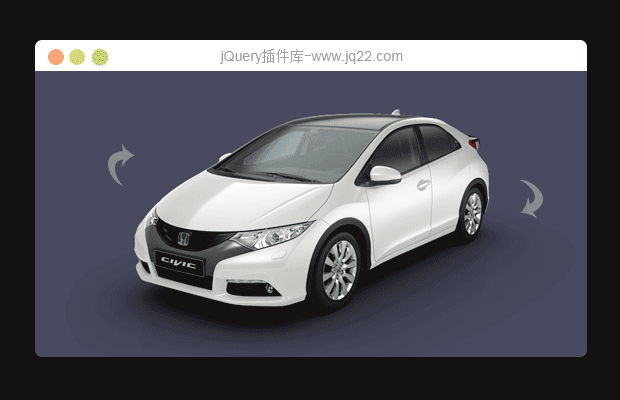


插件描述:可以逐帧播放,也可以进行自动播放,还可以制作出响应式和基于HTML5的全屏图片效果。
安装
可以通过bower来安装该360度产品图片预览插件。
bower install threesixty-slider
使用方法
下载压缩包,在页面中引入jquery,threesixty.min.js和threesixty.css文件。
<link href="css/threesixty.css" rel="stylesheet" />
<script src="js/jquery.min.js"></script>
<script src="js/threesixty.min.js"></script>
HTML结构
360度产品图片预览特效的基本HTML结构如下:
<div class="threesixty product1">
    <div class="spinner">
        <span>0%</span>
    </div>
    <ol class="threesixty_images"></ol>
</div>
初始化插件
在页面DOM元素加载完毕之后,可以通过下面的方法来初始化该360度产品图片预览插件。
window.onload = init;
var product;
function init() {
    product1 = $('.product1').ThreeSixty({
        totalFrames: 52,
        endFrame: 30,
        currentFrame: 1,
        imgList: '.threesixty_images',
        progress: '.spinner',
        imagePath: 'img/car/',
        filePrefix: '',
        ext: '.png',
        height: 447,
        width: 1000,
        navigation: true,
        disableSpin: false
    });
}
PREVIOUS:
NEXT:
相关插件-图片展示,滑块和旋转

jQuery原始图片对比插件
这是一款很实用的jQuery图片插件,它可以帮助你实现原图和经过处理的图片进行对比,这款jQuery插件一共有3中对比模式,主要是拖动中间的分割线来进行两张图片的细节对比。
图片展示
讨论这个项目(31)回答他人问题或分享插件使用方法奖励jQ币 评论用户自律公约


Jones 0
2021/6/25 9:45:51
-
怎么给一个角度的图片加上标记,像汽车之家那样一样啊

西瓜0
2021/6/25 10:51:55
-
div浮动层,使用css:position设置。position: relative; 绝对定位,position:absolute;相对定位
Jones0
2021/6/25 10:58:46
-
这很多图片结合的插件要基于这个插件给某个图片添加一个锚点,你居然和我说绝对定位
西瓜0
2021/6/25 11:07:12
-
看来是我理解错你想法,我以为你只是想在整个全景图上面加个标签。
Jones0
2021/6/25 11:27:43
-
有什么参数可以加锚点吗
西瓜0
2021/6/25 12:23:05
看了一下汽车之家的,自己结合一下了,
https://www.jq22.com/jquery-info12879
锚点结构差不多。


😃
- 😀
- 😉
- 😥
- 😵
- 😫
- 😘
- 😡
- 👍
- 🌹
- 👏
- 🍺
- 🍉
- 🌙
- ⭐
- 💖
- 💔
😃
取消回复
- 😀
- 😉
- 😥
- 😵
- 😫
- 😘
- 😡
- 👍
- 🌹
- 👏
- 🍺
- 🍉
- 🌙
- ⭐
- 💖
- 💔
