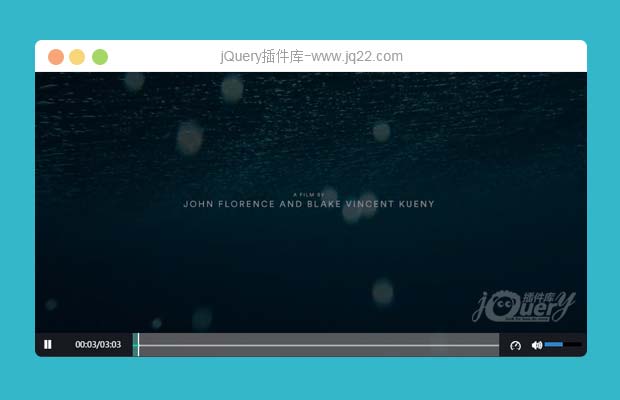


插件描述:基于html5的播放器插件不依赖任何框架引入即可使用
使用方法
在head标签内引入fz-video.css与iconfont.css
<link rel="stylesheet" href="./fz-video.css">
<link rel="stylesheet" href="./font/iconfont.css">
在body底部引入fz-video.js
<script src="./fz-video.js"></script>
随后实例化播放器即可
<script>
    var FZ_VIDEO = new createVideo(
        "testBox",  //容器的id
     {
          url: 'http://171.15.197.89/xdispatch/o8t28neoq.bkt.clouddn.com/test.mp4',  //视频地址
         autoplay:true          //是否自动播放
      }
    );
</script>
参数说明
createVideo的第一个参数为播放器容器的id,播放器宽高等同于容器的宽高
url: 视频的地址
autoplay: 视频准备就绪后,是否自动播放,true为自动播放,否则false
方法说明
 var FZ_VIDEO = new createVideo(参数); //实例化并创建播放器
 FZ_VIDEO.setUrl("URL");//切换视频,传入视频地址进行切换
 FZ_VIDEO.overVideo(); //移除播放器,且销毁实例,销毁后可重新进行实例化播放器
PREVIOUS:
NEXT:
相关插件-音频和视频
讨论这个项目(28)回答他人问题或分享插件使用方法奖励jQ币 评论用户自律公约


执着、 0
2017/11/13 15:43:07
Uncaught DOMException: Failed to execute 'end' on 'TimeRanges': The index provided (0) is greater than or equal to the maximum bound (0).怎么修改啊

Obsession0
2018/12/6 9:10:23
-
这个报错解决了么


兮兮_yu 0
2017/5/13 11:17:35
Uncaught DOMException: Failed to execute 'end' on 'TimeRanges': The index provided (0) is greater than or equal to the maximum bound (0).
at HTMLVideoElement.fzPools.VIDEO_DOM.ontimeupdate
出现这个错误,怎么修改呢
执着、0
2017/11/13 15:40:44
你解决了没有呢


😃
- 😀
- 😉
- 😥
- 😵
- 😫
- 😘
- 😡
- 👍
- 🌹
- 👏
- 🍺
- 🍉
- 🌙
- ⭐
- 💖
- 💔
😃
取消回复
- 😀
- 😉
- 😥
- 😵
- 😫
- 😘
- 😡
- 👍
- 🌹
- 👏
- 🍺
- 🍉
- 🌙
- ⭐
- 💖
- 💔
