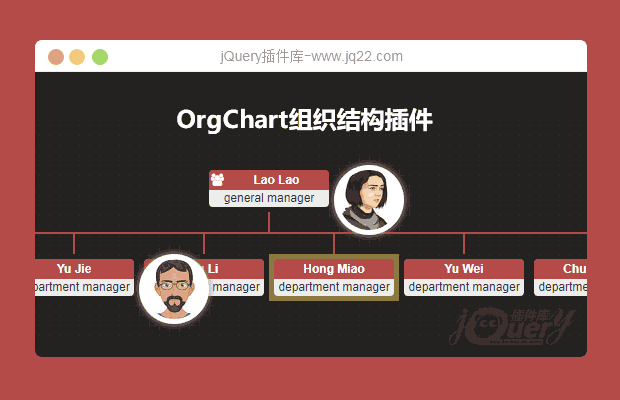


OrgChart
支持本地数据和远程数据(JSON)。
基于CSS3过渡的平滑扩展/折叠效果。
将图表对齐为4个方向。
允许用户通过拖放节点更改组织结构。
允许用户动态编辑组织图并将最终层次结构保存为JSON对象。
支持将图表导出为图片或pdf文档。
支持平移和缩放
用户可以采用多种解决方案来构建庞大的组织结构图(请参考多层或混合布局部分)
支持触摸的移动设备插件
使用方法
使用OrgChart组织结构图表插件需要在页面中引入jquery.orgchart.css,jquery和html2canvas.js、jquery.orgchart.js文件。
<link rel="stylesheet" href="css/jquery.orgchart.css" type="text/css"/>
<script type="text/javascript" src="js/jquery.min.js"></script>
<script type="text/javascript" src="js/html2canvas.js"></script>
<script type="text/javascript" src="js/jquery.orgchart.js"></script>
HTML结构
该组织结构图表插件的HTML结构使用一个<div>作为容器。
<div id="chart-container"></div>
使用本地数据
下面的代码使用本地数据作为组织结构图表的数据源。
// sample of core source code
var datascource = {
  'name': 'Lao Lao',
  'title': 'general manager',
  'relationship': { 'children_num': 3 },
  'children': [
    { 'name': 'Bo Miao', 'title': 'department manager',
      'relationship': { 'children_num': 0, 'parent_num': 1,'sibling_num': 2 }},
    { 'name': 'Su Miao', 'title': 'department manager',
      'relationship': { 'children_num': 2, 'parent_num': 1,'sibling_num': 2 },
      'children': [
        { 'name': 'Tie Hua', 'title': 'senior engineer',
          'relationship': { 'children_num': 0, 'parent_num': 1,'sibling_num': 1 }},
        { 'name': 'Hei Hei', 'title': 'senior engineer',
          'relationship': { 'children_num': 0, 'parent_num': 1,'sibling_num': 1 }}
      ]
    },
    { 'name': 'Yu Jie', 'title': 'department manager',
      'relationship': { 'children_num': 0, 'parent_num': 1,'sibling_num': 2 }}
  ]
};

$('#chart-container').orgchart({
  'data' : datascource,
  'depth': 2,
  'nodeTitle': 'name',
  'nodeContent': 'title'
});
使用Ajax远程数据
下面的代码通过Ajax来调用远程的数据作为组织结构图表的数据源。
$('#chart-container').orgchart({
  'data' : '/orgchart/initdata',
  'depth': 2,
  'nodeTitle': 'name',
  'nodeContent': 'title'
});
延迟加载数据
下面的代码在用户点击相应的结点时才动态的通过Ajax来加载数据。
var datascource = {
  'id': '1',
  'name': 'Su Miao',
  'title': 'department manager',
  'relationship': { 'children_num': 2, 'parent_num': 1,'sibling_num': 2 },
  'children': [
    { 'id': '2','name': 'Tie Hua', 'title': 'senior engineer',
      'relationship': { 'children_num': 0, 'parent_num': 1,'sibling_num': 1 }},
    { 'id': '3','name': 'Hei Hei', 'title': 'senior engineer',
      'relationship': { 'children_num': 2, 'parent_num': 1,'sibling_num': 1 }}
  ]
};

var ajaxURLs = {
  'children': '/orgchart/children/',
  'parent': '/orgchart/parent/',
  'siblings': '/orgchart/siblings/',
  'families': '/orgchart/families/'
};

$('#chart-container').orgchart({
  'data' : datascource,
  'ajaxURL': ajaxURLs,
  'nodeTitle': 'name',
  'nodeContent': 'title',
  'nodeId': 'id'
});
自定义数据节点
下面的代码为组织结构图表中的每一个节点自定义一个头像。
$('#chart-container').orgchart({
  'data' : datascource,
  'depth': 2,
  'nodeTitle': 'name',
  'nodeContent': 'title',
  'nodeID': 'id',
  'createNode': function($node, data) {
    var nodePrompt = $('<i>', {
      'class': 'fa fa-info-circle second-menu-icon',
      click: function() {
        $(this).siblings('.second-menu').toggle();
      }
    });
    var secondMenu = '<div class="second-menu"><img class="avatar" src="../img/avatar/' + data.id + '.jpg"></div>';
    $node.append(nodePrompt).append(secondMenu);
  }
});
方法
在您试用demo - edit orgchart之后,我确信您可以掌握以下方法的要点。
var oc = $ container.orgchart(options)
在指定的容器中嵌入组织结构图。接受选项对象,您可以通过“选项”部分查找所需的选项。变量oc是类OrgChart的实例。
var oc = $container.orgchart(options)
当用户想要根据新选项重新初始化或刷新orgchart或重新加载新数据时,这是一种有用的方法。
init(newOptions)
为当前组织图添加父节点(actullay它始终是根节点)。
| Name | Type | Required | Default | Description |
|---|---|---|---|---|
| data | json object | yes | datasource for building root node |
addSiblings($node, data)
为指定节点添加同级节点。
| Name | Type | Required | Default | Description |
|---|---|---|---|---|
| $node | jquery object | yes | we'll add sibling nodes based on this node | |
| data | array | yes | datasource for building sibling nodes |
addChildren($node, data)
为设计的节点添加子节点。
| Name | Type | Required | Default | Description |
|---|---|---|---|---|
| $node | jquery object | yes | we'll add child nodes based on this node | |
| data | array | yes | datasource for building child nodes |
removeNodes($node)
删除指定的节点及其下降的节点。
| Name | Type | Required | Default | Description |
|---|---|---|---|---|
| $node | jquery object | yes | node to be removed |
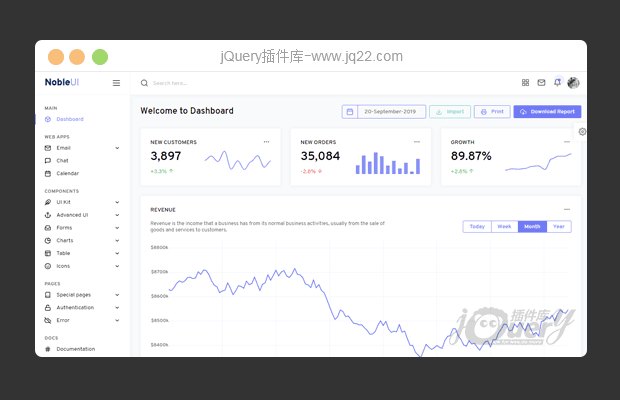
灵活和响应的Bootstrap管理模板NobleUI
NobleUI,灵活和响应的Bootstrap管理模板,一个专业的软件包,包含大量的UI组件,表单,表格,图表,页面和svg图标。 每个都是完全可定制,响应和易于使用。

- 😀
- 😉
- 😥
- 😵
- 😫
- 😘
- 😡
- 👍
- 🌹
- 👏
- 🍺
- 🍉
- 🌙
- ⭐
- 💖
- 💔
- 😀
- 😉
- 😥
- 😵
- 😫
- 😘
- 😡
- 👍
- 🌹
- 👏
- 🍺
- 🍉
- 🌙
- ⭐
- 💖
- 💔
